The Status Quo
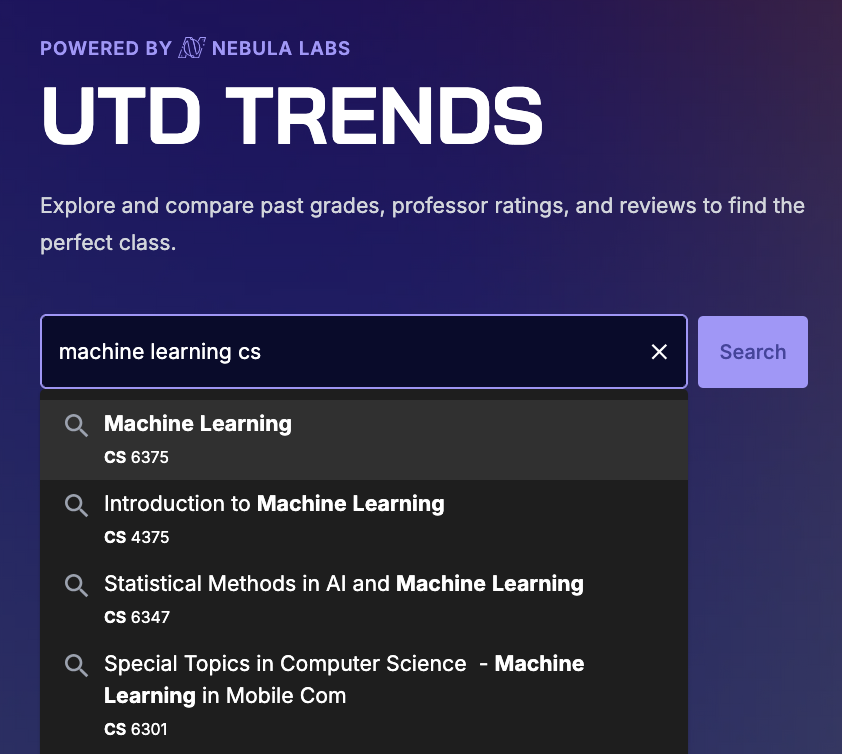
UTD Trends is an open-source platform that makes course scheduling easier by providing historical grade data and ratings for courses and professors at the university. The primary engine the users use to interact with this data is the search bar.
The Trends search bar is an intricate component chock-full of logic to match queries with courses and professors, and optimizations to improve speed of suggestions.
At a high level, we work with a list of professors and a list of courses offered by the university.
The autocomplete system first checks if the query matches any courses. If not, then it switches over and tries to find professors that match.
The autocomplete graph is generated so that all possible user queries that could result in a course prefix, number or professor name are nodes in a radix tree. This leaves no room for fuzzy matching, and – if I want to modify autocomplete results – requires either a complex restructuring of the graph generation, or a separate solution. I chose the latter.
Goal
One of the most requested features that we heard back in October (when we launched Trends 2.0) was the ability to search for a class by its name. For example, Linear Algebra’s course number is MATH 2418. It’s much more intuitive to search for “Linear Algebra” than to remember what the course number is for that class. We planned to address this in the Spring, but we knew that it would be a complex feature to implement.
For starters, we would need a way to detect that the user is searching for a course name. Since course number and professor name searches were already working well, we don’t want to interfere with those.
Next, storing entire course names in an autocomplete graph takes up space, and a few megabytes can really impact performance (even if we cache it) because of the graph traversals. Typing and edits occur really quickly and the autocomplete should be just as fast — if not faster — than the user.
Finally, the actual text matching is complex. Sure we could use a library, but where’s the fun in that? Additionally, the text students will search for has shared characteristics – we can make assumptions on behalf of the user to optimize and return better/more-accurate results the way users intend.
As project lead, I always maintained that we first brainstorm ideas without thinking of constraints or obstacles. What is the ideal version of Trends? If it includes user reviews, smart syllabus analysis, and (in this case) course name search, then we should use those ideals as a north star as we navigate any obstacles in the way.
Therefore, my goal was to lay down the foundation for searching by course name – accounting for edge cases, fuzzy searches, and the logic of the search – over the summer. If we could devise a theoretical algorithm to suggest autocomplete course names, then Trends Engineers could implement it in the fall.
But then Tyler* went ahead and brute forced it. So I got mad and spent a couple weeks on this:
Tyler’s Attempt
*Tyler Hill was our VP and an insane engineer. Take a look at how much code and commits he has contributed to each of our projects. He’s now the Nebula Labs President :-)
Solution
To address the graph generation, Tyler’s attempt gave way to the possibility of using two dictionaries (one mapping course number to name, and the other mapping name to possible course numbers) in conjunction with word matching. The dictionary table generation & modifying the autocomplete endpoint were trivial compared to the actual ranking process.
Let’s jump to the end and work our way backwards. The distance between the user’s query and each autocomplete result is calculated using the following metrics:
- Course Number match (
smartNumberMatch)
- Edit Distance between the course name and user’s query words (
distanceMetric)
- How much of the query is captured by the title words (
smartWordCapture)
- Course Prefix match (
prefixPriority)
distanceMetric and smartWordCapture are contradictory because the former sees how close each course name and the query, whereas the latter measures how close the query is to each course name.
Here’s the Pull Request
The reason we didn’t just use a pre-built library like autocomplete-js or Typeahead.js is because the domain of courses (each with a name, prefix, and number) allows us to be more personal with the results if done right. For example, we wanted to support queries like “Machine Learning CS” to give autocomplete results like CS 4375 (“Introduction to Machine Learning”), instead of OPRE 6343 (“Applied Machine Learning”) through the prefixPriority metric. Conversely, the smartNumberMatch metric, though seldom used, can help rank undergrad level classes (4xxx) higher than a graduate class (6xxx). Instead, smartNumberMatch works best in a fuzzy-search setting as a spellchecker; it can help suggest a course like CS 4390 if I mistype it as CS 4490. That’s really cool!
Helper Functions
TS
/** Checks if the query word is/partially a prefix and @returns potential prefix matches */
function isPotentialPrefix(query: string): string[] {
  const prefixMatch = query.match(/^[A-Za-z]+/);
  if (!prefixMatch) return [];
  const extractedPrefix = prefixMatch[0];

  return coursePrefixes.filter((prefix) =>
    prefix.toLowerCase().startsWith(extractedPrefix.toLowerCase()),
  );
}

/** Checks if query word is 1-4 digits and @returns the exctracted 4 digits if valid or a blank string */
function isPotentialCourseNumber(query: string): string {
  // Extract numeric part with optional 'v' in second position (digits at the end or standalone)
  const numberMatch = query.match(/\d+[vV]?\d*$/);
  if (!numberMatch) return '';
  const extractedNumber = numberMatch[0];

  // Check if it's 1-4 characters and follows the pattern: digit + optional 'v' + digits
  // Valid patterns: 1-4 digits OR digit + v + 1-2 digits
  const isValid = /^(\d{1,4}|\d[vV]\d{1,2})$/.test(extractedNumber);

  return isValid ? extractedNumber : '';
}

/** @returns length of the longest common substring between the 2 strings that starts at the beginning of str1 */
function longestCommonPrefix(str1: string, str2: string): number {
  let count = 0;
  const minLength = Math.min(str1.length, str2.length);

  for (let i = 0; i < minLength; i++) {
    if (str1.toLowerCase()[i] === str2.toLowerCase()[i]) {
      count++;
    } else {
      break; // Stop at first mismatch
    }
  }

  return count;
}

// Edit distance between 2 strings
function editDistance(a: string, b: string) {
  const dp = Array.from({ length: a.length + 1 }, () =>
    Array(b.length + 1).fill(0),
  );
  for (let i = 0; i <= a.length; i++) dp[i][0] = i;
  for (let j = 0; j <= b.length; j++) dp[0][j] = j;

  for (let i = 1; i <= a.length; i++) {
    for (let j = 1; j <= b.length; j++) {
      if (a[i - 1] === b[j - 1]) {
        dp[i][j] = dp[i - 1][j - 1];
      } else {
        dp[i][j] = Math.min(
          dp[i - 1][j] + 1, // deletion
          dp[i][j - 1] + 1, // insertion
          dp[i - 1][j - 1] + 1, // substitution
        );
      }
    }
  }
  return dp[a.length][b.length];
}

/** @returns the distance to the closest query word to one title word
 * @param queries - array of query words
 * @param word - a single word from the course title
 */
function minEditDistance(queries: string[], word: string) {
  return queries.length > 0 && word.length > 0
    ? Math.min(...queries.map((query) => editDistance(query, word)))
    : 10000;
}

/** Fuzzy matches word with target by using editDistance */
function findSimilarity(word: string, target: string): number {
  // Fuzzy matching for typos
  const distance = editDistance(word.toLowerCase(), target.toLowerCase());
  const maxLen = Math.max(word.length, target.length);
  return 1 - distance / maxLen;
}
Now how is each metric calculated? Well,
Course Number Match
checks first how many of the digits match in sequence, so CS 433x ranks higher than CS 43x3. This makes sense for our domain because a lot of courses have the same first 2 digits, and misspellings tend to occur in the latter 2 digits (because they are harder to remember). After this, the overall similarity is found through their edit distances in findSimilarity.
smartNumberMatch code
TS
// boosts it if the course number matches (fuzzy - allows spelling mistakes)
const smartNumberMatch =
  courseNumbers
    .map((number) => {
      if (result.number) {
        const prefixScore = longestCommonPrefix(number, result.number); // show numbers that differ by the last digit higher
        const similarity = findSimilarity(number, result.number);
        if (similarity > 0.9) {
          return -10 * similarity - prefixScore;
        } else if (similarity > 0.7) {
          return -8 * similarity - prefixScore;
        } else if (similarity > 0.5) {
          return -3 * similarity - prefixScore;
        }
      }
      return 0;
    })
    .sort((a, b) => b - a)[0] ?? 0;
I over-emphasize higher similarity scores in a piecewise-function coupled with the prefix match to help show those results higher in the autocomplete.
The most consistent metric is the
Edit Distance
because it measures how far off the user’s query is from each title. For each word in the course name, it records the distance to the closest query word. A breakthrough in increasing the quality of ranking came by discounting words with further edit distances:
editDistance code
TS
//for each word in the course name, find the word in the query that is most similar
const distances = titleWords.map((word) => minEditDistance(inputArr, word));
// edit distance between the course title and query words, with a discounted weight on more distant words
const distanceMetric =
  distances
    .sort((a, b) => a - b)
    .reduce(
      (partialSum, dist, i) => partialSum + Math.pow(0.7, i) * dist, // discount weight by 0.7^i
      0,
    );
This helps in cases like when the user searches for “Machine Learning” expecting “Introduction to Machine Learning.” I’d reckon most searches are looking for the undergrad version of the CS class, instead of OPRE 6364 (“Applied Machine Learning”). Without the discount factor, the “Introduction” edit distance would be penalized too much. This is still not perfect, which is why we include
Word Capture
matching title to each query. For each query word, it finds the most similar title word and assigns a bestScore using a piecewise scale. 100% word captures are ranked the highest.
smartWordCapture code
TS
// How much of the query is captured by the title words
const smartWordCapture =
  inputArr
    .map((word) => {
      let bestScore = 0;

      titleWords.forEach((tw) => {
        // For each title word
        // Exact inclusion (original behavior)
        if (tw.includes(word)) {
          bestScore = Math.min(bestScore, -10);
          return;
        }

        const similarity = findSimilarity(word, tw);
        if (similarity > 0.7) {
          bestScore = Math.min(bestScore, -8 * similarity);
        }
        if (similarity > 0.5) {
          bestScore = Math.min(bestScore, -3 * similarity);
        }
      });

      return bestScore;
    })
    .reduce((a, b) => a + b, 0);
Combining it all together
Distance Score
TS
return {
  distance:
    (smartNumberMatch < 0 ? 0 : distanceMetric) + // if checking course number, ignore distance metric
    2 * smartWordCapture + // double weight for word capture
    prefixPriority +
    smartNumberMatch,
  title: title,
  result: result,
};
The code above shows how all the metrics come together into one distance number for each course name. More negative is better. Let me spell out the logic:
- If there is a non-zero match for a course number, then ignore the
distanceMetric (prioritize the smartNumberMatch higher in our courses domain)
- Double the weight for
smartWordCapture because it’s actually a really strong metric for our domain
- Just add
prefixPriority and smartNumberMatch :)
And there you have it!
Ranking
Ranking itself is self explanatory. One quirk is that we wanted to limit how many results are shown, because as you scroll the quality gets comically worse. Especially when you are searching for courses with short names.
A fixed numerical cutoff doesn't scale well. Also autocomplete or searching in search engines like Google tend to narrow the suggestions as your query gets closer to a match.
It was at this moment that I remembered all of my struggles in AP Stats and CS 3341. One word came to my mind: Standard Deviation.
SD Cutoff
TS
// calculate cutoff for 1 standard deviation
const cut = results[Math.floor(0)].distance;
const variance =
  results.reduce((sum, d) => sum + Math.pow(d.distance - cut, 2), 0) /
  results.length; // Calculate variance
const stdDev = Math.sqrt(variance); // Calculate standard deviation
const oneStdCutoff = cut + 1 * stdDev; // 1 standard deviation cutoff
const resultsWithoutDistance: Result[] =
  results
    .filter((r) => r.distance <= oneStdCutoff)
    .map((result) => ({
      title: result.title,
      result: result.result,
    }));
I calculate the cutoff of 1SD centered on the first result’s score. Reasoning for this is that we want all our results to be similar in quality to the best one.
And that’s that.
Areas of improvement
That’s not that.
There are some problems in terms of the quality of autocompletion. These are caused by the tradeoff between accuracy (suggesting courses based on the query) and context (what the user actually wants). Here are some examples:
- Our favorite “Machine Learning” query does not even show “Introduction to Machine Learning.” The classes it does show (the graduate “Machine Learning”, “Applied Machine Learning”, and “Statistical Machine Learning” are taken less frequently. Some fixes to address this can include:
- Add a metric based on how many students have taken the course (Trends has this data)
- Prioritize undergrad courses slightly higher (need to look at the actual distance scores to see how much to weight this)
- For “Operating Systems,” there are a lot of different prefixes for the same course (CS, CE, EE, etc). These can be functionally grouped in terms of the cutoff so more unique courses can be included. The UI for this could also be cleaner.
We’re addressing these in our ongoing issue for improvements to the autocomplete.
So what did we learn?
This was a fun project to work on during the summer. I guess this whole post was about my learning, but I really did have to research how Google used to pagerank, read some papers, and play around with weights. Sometimes the results got worse before they got better, and I had to pick a lot of representative benchmark queries to measure performance. What we have now is acceptable, and it works if the user knows how to use it. Improvements are necessary though, so I’ll let you know when we get to that.
But first, we need to refactor the Planner page…
Back to Abhiram's Blog